
Node Movement Part 1

So the whole point of creating the node map was to constrain Pacman's movement so that he can only move from node to node and nowhere else. This section will show you how to do that. We will cover three types of node movement, each one building off of the other.

Having a map of connected nodes is great, but now we have to teach Pacman how to move around the maze from node to node. The first type of movement we're going to teach him is simply jumping from node to node. For example, let's say that we have two nodes A and B connected to each other. If Pacman is on Node A and Node A has a neighbor to the LEFT called Node B, then if the player pressed the LEFT key, Pacman would immediately appear on Node B without any indication of movement between the two nodes. If Node A didn't have a neighbor to the LEFT and the player pressed the LEFT key, then nothing would happen. This really isn't how Pacman moves around the maze, but it's a first step and has a lot of useful applications. Let's just dive right into the necessary code changes we need to make. Surprisingly, there isn't that much we need to modify.


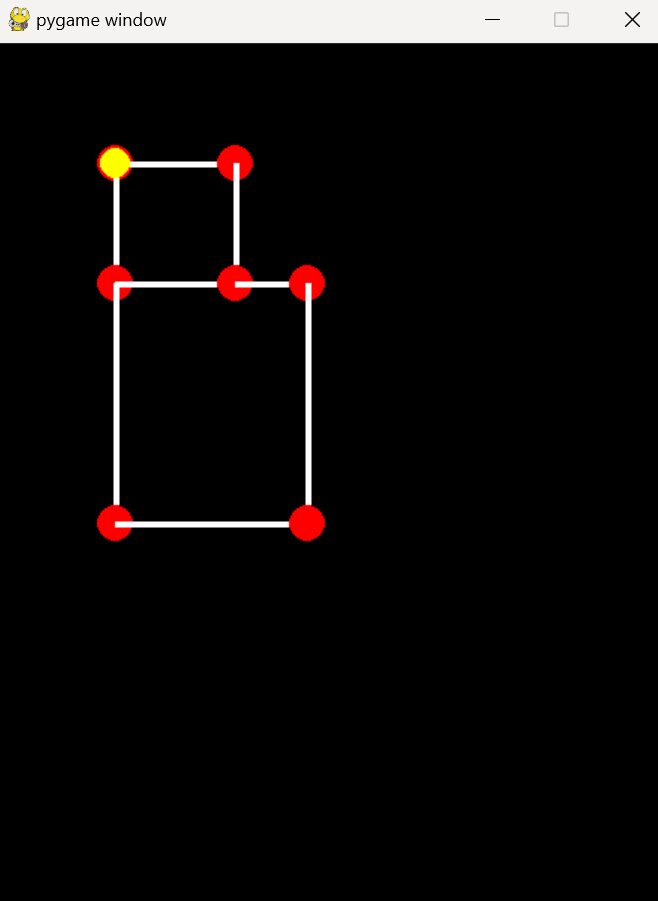
Pacman sitting on a Node

Instead of giving Pacman some random starting position, let's have him start on a Node. We'll create a variable called "node" which is always the node Pacman is on. What if he's not on a Node? At this stage of the game he's always on a Node, so that's a dumb question.

We create a new method called setPosition. Here we specify Pacman's position by copying the node's position. We actually have to specify the copy() method here otherwise the node will move with Pacman whenever Pacman moves which is not what we want.

pacman.py

                          
class Pacman(object):
    def __init__(self, node):
        self.setPosition(node)
        # self.position = pygame.Vector2(200, 400)
        self.direction = pygame.Vector2()
        self.speed = 100 * TILEWIDTH/16
        self.radius = 10
        self.color = YELLOW
    
    def setPosition(self, node):
        self.node = node
        self.position = node.position.copy()


Update startGame

In the run.py file we're going to modify the startGame method so that we pass in the node we want Pacman to start on. The first node in the list is as good as any for the time being.

run.py

                          
def startGame(self):
    self.setBackground()
    self.nodes = NodeGroup()
    self.nodes.setupTestNodes()
    self.pacman = Pacman(self.nodes.nodeList[0])


Valid Direction Methods

We're adding two new methods in the Pacman class that determine the valid directions that Pacman can go. Whenever we land on a node we'll call the setValidDirections method which goes through the nodes list of neighbors and updates the validDirections list with the directions that Pacman is allowed to move in.

In the checkValidDirections method we'll basically just ask if the direction being passed in is in fact one of the valid directions. It will return True if so.

pacman.py

                          
def setValidDirections(self):
    '''Given that the player is on a Node, set the valid directions to this nodes neighbors'''
    validDirections = []
    for neighbor in self.node.neighbors:
        direction = neighbor.position - self.node.position
        validDirections.append(direction.normalize())
    return validDirections

def checkValidDirection(self, direction):
    '''Check that the direction we want to go is in a valid direction'''
    if direction in self.validDirections: return True
    return False


Update Methods

We need to update these two methods to account for the new methods we just created above. When we set Pacman's position we'll call the setValidDirections method to update the validDirections list.

When we call the updateDirection method we'll check to see if the direction is valid. If so, then we call the setPosition method by passing in the new node. We'll create that method next.

For now comment out the line in the update method since this type of movement will not work if that's running. Or you can just comment out Pacman's update method from the run.py file. It'll have the same effect, and it's only temporary anyways.

pacman.py

                          
def setPosition(self, node):
    self.node = node
    self.position = node.position.copy()
    self.validDirections = self.setValidDirections()

def updateDirection(self, direction):
    if self.checkValidDirection(direction):
        self.direction = direction
        self.setPosition(self.node.getNeighborByDirection(direction))

def update(self, dt):	
    # self.position += self.direction * self.speed * dt
    pass


New Node Method

We call this method in order to determine which of the nodes neighbors are in the specified direction. We find that node and return it since that will be the new node Pacman has to move to.

nodes.py

                          
def getNeighborByDirection(self, direction):
    for neighbor in self.neighbors:
        test = (neighbor.position - self.position).normalize()
        if test == direction: return neighbor
    return None


Run and Finish

When running the code you'll notice that Pacman moves from node to node quickly by just jumping directly from one node to the next. This is a start, but not exactly what we want. We want to see Pacman move smoothly from one node to the next node. So that's what we'll do in the next section.

Blank Screen


Download

You can download the files up to this point by clicking on the following folder.

Blank Screen