Node Movement Part 2

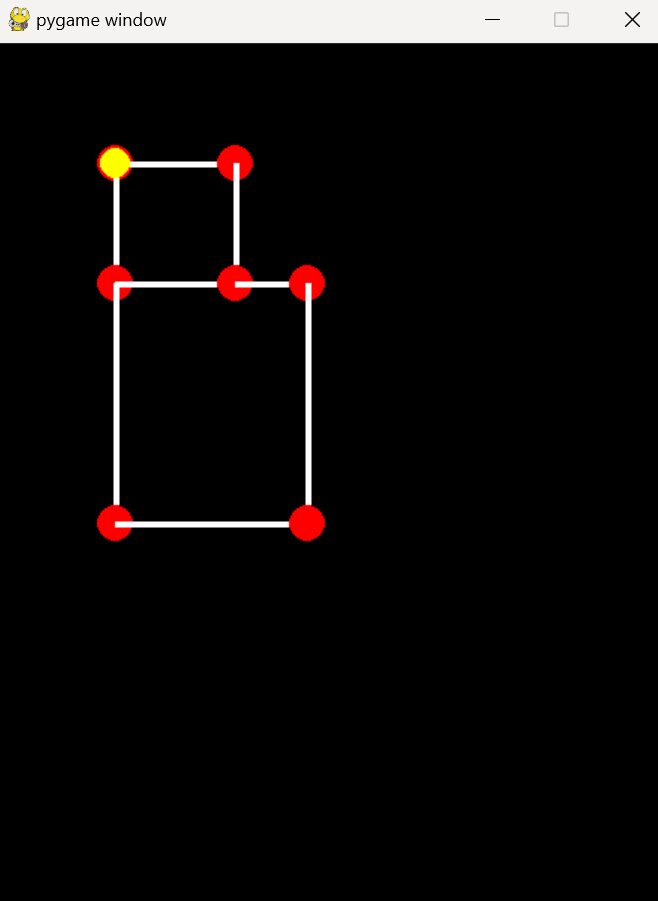
So we have Pacman jumping from node to node and that's a great first step. What we really want is to actually see him moving smoothly in between the nodes as well. In this part we'll have him move in between the nodes, but he'll always stop on each node even if a key is being pressed. This isn't the final movement for Pacman, but just the next step to fully understanding how he moves within a maze of nodes.


Smooth Movement, no Jumping

The first thing we want to do is uncomment the line in Pacman's update method. We commented this out previously to show the previous movement. We also want to comment out the setPosition call in the updateDirection method. This is what made Pacman jump from one node to the next. Instead, we'll take that node and set it as Pacman's node. This node is always either the node Pacman is on or moving towards. So now instead of telling him to jump to that node directly, we're telling him to simply move to that node.

If you were to run the game after making these changes, then press a valid direction key, you'd see pacman moving smoothly. But the issue is that he pypasses the next node. We need him to be able to detect when he's reached the next node.

pacman.py

                          
def updateDirection(self, direction):
    if self.checkValidDirection(direction):
        self.direction = direction
        # self.setPosition(self.node.getNeighborByDirection(direction))
        self.node = self.node.getNeighborByDirection(direction)

def update(self, dt):	
    self.position += self.direction * self.speed * dt


Overshooting the Next Node

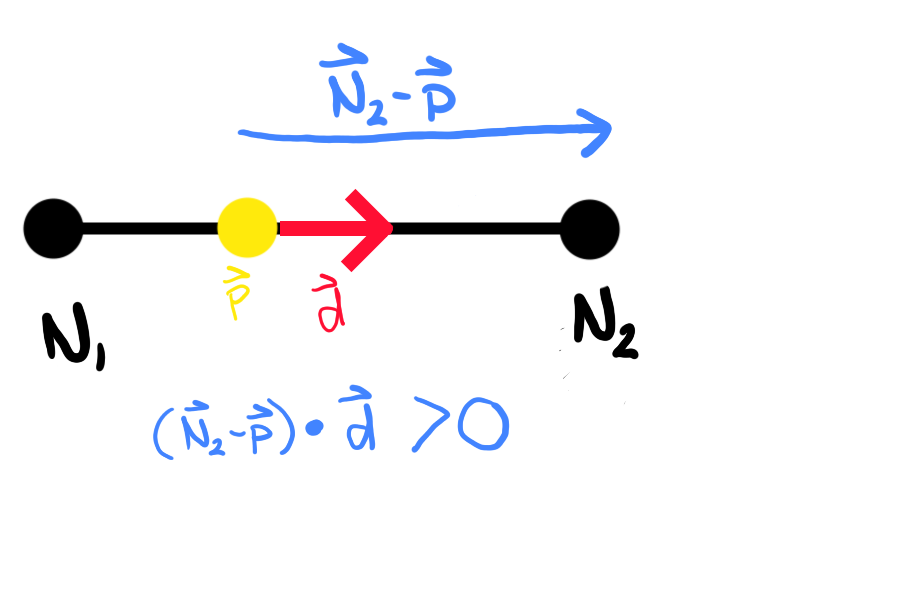
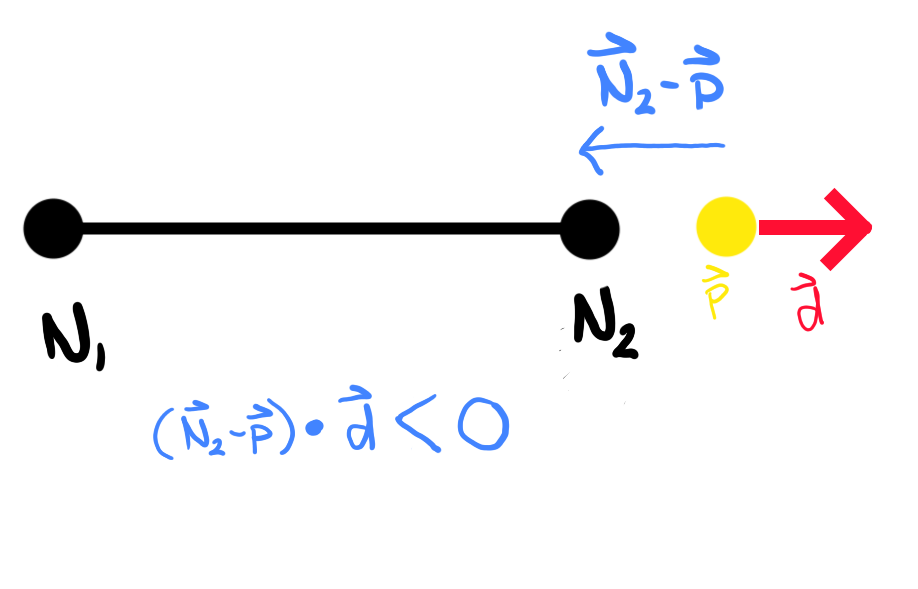
Like I said above, we need to be able to detect when Pacman has overshot the next node he's moving towards. If you look at the two images below you'll see that the "Before" image shows Pacman (yellow circle) between two nodes (N1 and N2). If we take Pacman's direction vector (d) and do a dot product operation with the vector that points from Pacman to node N2 that will return either a positive or a negative value. When doing the dot product you'll get a positive value of the two vectors are pointing in the same direction. The actual value of the dot product doesn't matter. If two vectors are pointing in opposite directions, as is the case in the "After" image when Pacman has overshot the N2 node, then the dot product value will be negative.


Overshooting a Node

Before

After


Overshot Method

So like I mentioned above, in order to detect if Pacman has overshot a node we just need to take the dot product of his direction Vector with the vector that points from him to the node he's moving towards. To do that we'll create a new method in the Pacman class to check for this.

the vec variable is the vector that points from Pacman to the node he's moving towards. If we detect that he has indeed overshot that node, we'll simply place him on that node as we did before in the updateDirection method.

pacman.py

                          
def overshot(self):
    '''Check if overshot node'''
    vec = self.node.position - self.position
    if self.direction.dot(vec) < 0:  
        self.setPosition(self.node)


Update Methods

We'll add the call to the overshot method in Pacman's update method after we tell him to move to a new position.

pacman.py

                          
def update(self, dt):	
    self.position += self.direction * self.speed * dt
    self.overshot()


Warning

We're not done yet. If you were to run the game at this point and choose a valid direction, you'll see Pacman move once then the program will crash with an error. But it's good to understand why we're getting this error.


Fixing Error - Valid Directions List

The reason we get the error is because we did not update our valid directions list. The first node we were on has valid directions for moving to the right or down. If you chose to move to the right, then we set that node as our new node. However, that node has a different set of valid directions and moving right isn't one of them. But we don't want to update Pacman's valid directions to the new nodes valid directions until we actually reach the node.

When Pacman is moving between nodes then the only directions he should be allowed to move in are the direction he's already going and the reverse direction. That's it. So we'll need to create a new method called updateValidDirections and set the valid directions list to exactly what I just said: the direction he's already moving in and the reverse direction which is just the negative of his current direction.

Then we'll update the updateDirection method by calling the new method after we set our new node. Notice that we also added another condition. So the updateDirection gets called every iteration of the gameloop which passes in a direction that the player is trying to move in by pressing the corresponding key. If the player is not pressing any keys then the direction is simply the zero vector. Either way we're always checking if this direction is a valid direction or not. But the rest of the code we only want to happen once, not continuously. So we add another condition to check to make sure Pacman isn't moving. If he is already moving then we want to ignore the rest of this code.

pacman.py

                          
def updateValidDirections(self):
    self.validDirections = [self.direction, -self.direction]

def updateDirection(self, direction):
    if self.checkValidDirection(direction):
        if self.direction == pygame.Vector2():  #Pacman is stopped on a node
            self.direction = direction
            self.node = self.node.getNeighborByDirection(direction)
            # self.setPosition(self.node.getNeighborByDirection(direction))
            self.updateValidDirections()


Fixing Error - Valid Directions List

The final thing we need to do is when we do actually reach the node and place Pacman on that node, we need to set his direction to the zero vector. That sort of resets the whole process and allows us to choose a new direction for him to move in.

pacman.py

                          
def setPosition(self, node):
    self.node = node
    self.position = node.position.copy()
    self.validDirections = self.setValidDirections()
    self.direction = pygame.Vector2()


Run and Finish

When running the code now you'll see him moving from node to node smoothly. Once he reaches a node he will stop on that node and await further instruction. Then you can choose a different node to move towards. This is better, but still not exactly the way Pacman moves. For one, he's able to reverse direction whenever we want. Also, if he's moving towards a node and the user isn't pressing any keys and he's able to move on to another node in that same direction, he'll just keep on going rather than stopping on every node. So we'll take care of that in the next section.

Blank Screen


Download

You can download the files up to this point by clicking on the following folder.

Blank Screen